A founder often discovers the data problem backward. Sales has a customer spreadsheet in Google Drive. Support exports tickets into a shared folder. Finance stores forecasts in a SaaS tool. Product teams paste user feedback into Notion, Slack, and an AI assistant. Nothing looks dramatic on its own. Together, it creates a business with valuable information scattered across systems and no clear map of what matters most.
That's where the question what is data classification stops being academic. It becomes operational. If a company can't tell the difference between a public case study, an internal hiring plan, a customer email list, and a file full of health or payment details, it can't apply the right safeguards. It also can't respond cleanly when a customer asks where their data lives, or when a security incident forces the team to make decisions fast.
For startups and small businesses, the trap is assuming classification is an enterprise-only exercise. It isn't. Large companies buy bigger tools, but the underlying problem is the same. A business either knows what data it has, why it matters, who should touch it, and what controls belong around it, or it doesn't.
Your Data Is an Asset and a Liability
A young company usually starts with speed. That's rational. Teams need to launch, sell, hire, and iterate. In that environment, every new system promises convenience. HubSpot holds leads, Stripe holds billing records, Google Workspace holds contracts, Slack holds candid internal discussions, and product analytics platforms hold user behavior data.
The problem isn't the existence of data. The problem is unmanaged accumulation.
A customer list is an asset because it supports revenue. The same list is a liability if it's exported, overshared, or copied into the wrong tool. User feedback is an asset because it improves the product. The same feedback becomes a legal and security risk when it contains names, medical details, or financial references nobody noticed. Vendor contracts help procurement move faster. They also expose pricing terms, indemnity obligations, and security commitments that shouldn't sit in an open folder.
Growth creates blind spots
Startups rarely fail to classify data because they don't care. They fail because classification feels abstract while product deadlines feel immediate. So files pile up unlabeled. Permissions get inherited. New hires get broad access because narrowing access takes time.
Sensitive data doesn't become risky only after a breach. It becomes risky the moment a company loses track of where it lives and who can use it.
That blind spot shows up in practical ways:
- Security spending gets diluted: Teams buy broad controls without knowing which systems need the strongest protections.
- Customer diligence gets harder: Enterprise buyers ask where personal data is stored and how access is restricted.
- Incident response slows down: Nobody can quickly separate low-risk files from the records that trigger legal obligations.
- AI use expands risk: Staff paste internal material into public models without a policy for what may or may not be used.
A company in that position doesn't need panic. It needs order. Classification is part of that order, alongside access control, retention, contracts, and a tested cyber incident response plan.
The Foundations of Data Classification
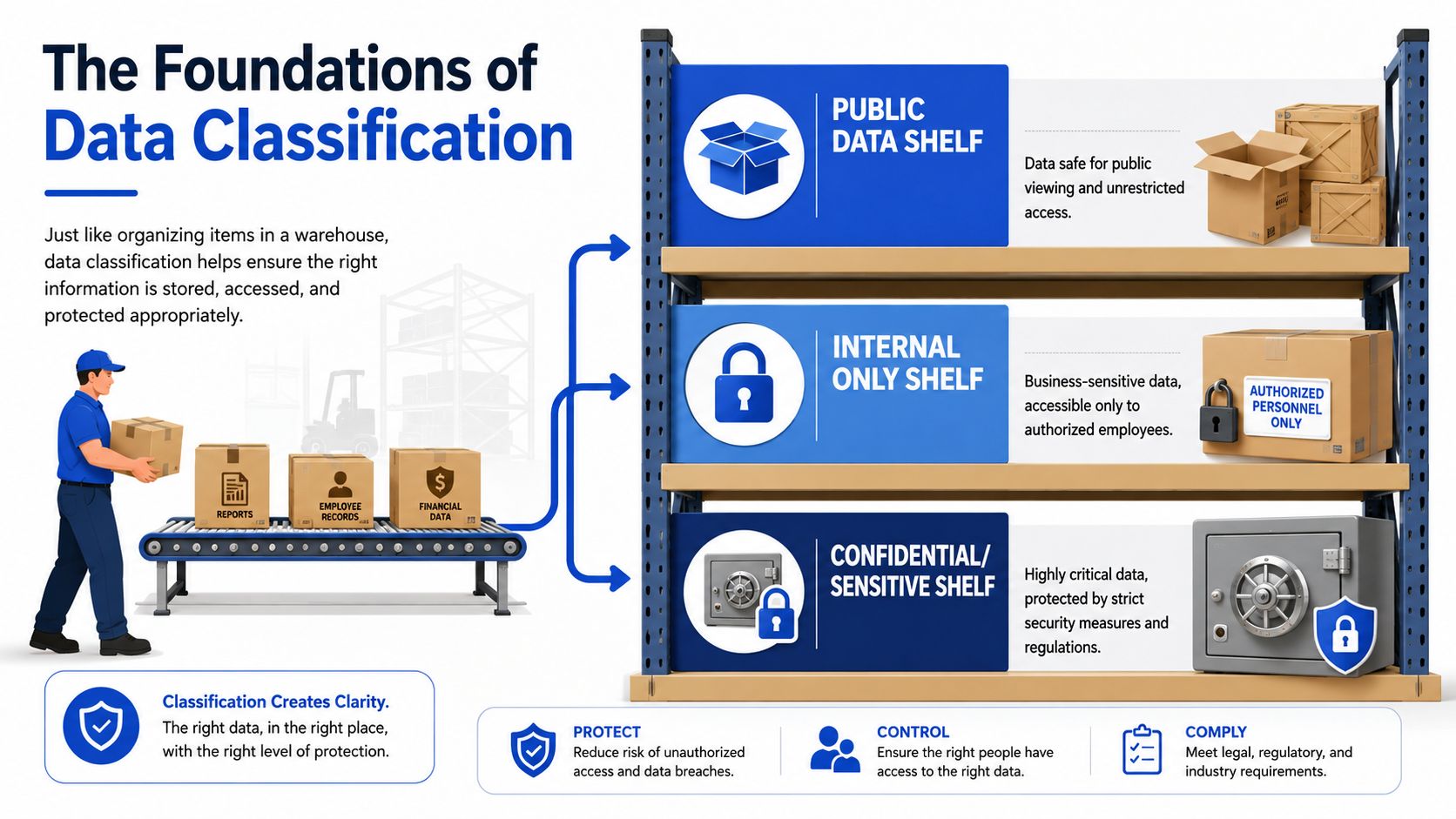
Data classification is the process of sorting business information into categories so the company can handle each type appropriately. The simplest analogy is a warehouse. Cheap, durable items can sit on open shelves. Fragile or valuable items go into protected storage. The object itself doesn't change. The handling rules do.
That's how classification works with data. A startup doesn't protect every file the same way because every file doesn't create the same legal, commercial, or operational risk.
The common four-tier model
A practical schema usually uses four levels. As Spirion explains, a typical data classification schema uses Public, Private, Confidential, and Restricted. The level dictates security controls, and Restricted data such as PII or PHI requires the strongest protection, including encryption and strict access logging, to support compliance with laws such as GDPR and HIPAA.
For a startup, those labels become easier to use when translated into ordinary business examples:
| Classification level | What it means | Startup examples |
|---|---|---|
| Public | Safe to share outside the company | Website copy, blog posts, press releases, public pricing page |
| Private | Internal business material that shouldn't be public | Team meeting notes, internal process docs, draft hiring plans |
| Confidential | Sensitive business information with meaningful downside if disclosed | Financial forecasts, customer contracts, roadmap documents, unpublished product specs |
| Restricted | Data that could trigger legal, security, or severe commercial harm if exposed | Customer PII, health data, payment data, trade secrets, source code in critical repositories |
Labels only work when they change behavior
Classification fails when teams treat labels as decoration. A tag on a document means very little if access permissions, sharing rules, retention periods, and monitoring don't change with the tag.
A useful way to think about it is this:
- Public data needs accuracy and integrity.
- Private data needs limited internal access.
- Confidential data needs tighter sharing controls and closer oversight.
- Restricted data needs the highest baseline protections and the shortest list of approved users.
The exact words can vary. Some companies use “Internal” instead of “Private.” What matters is consistency. If the team can't explain what each level means in one sentence, the system is too complicated.
For founders trying to balance analytics, governance, and product execution, this broader view of ensuring data privacy and quality is useful because it connects classification to the day-to-day reliability of business data, not just formal compliance.
Practical rule: If an employee can't tell within a few seconds how a file should be labeled, the taxonomy needs simplification.
Why Data Classification Is a Business Imperative
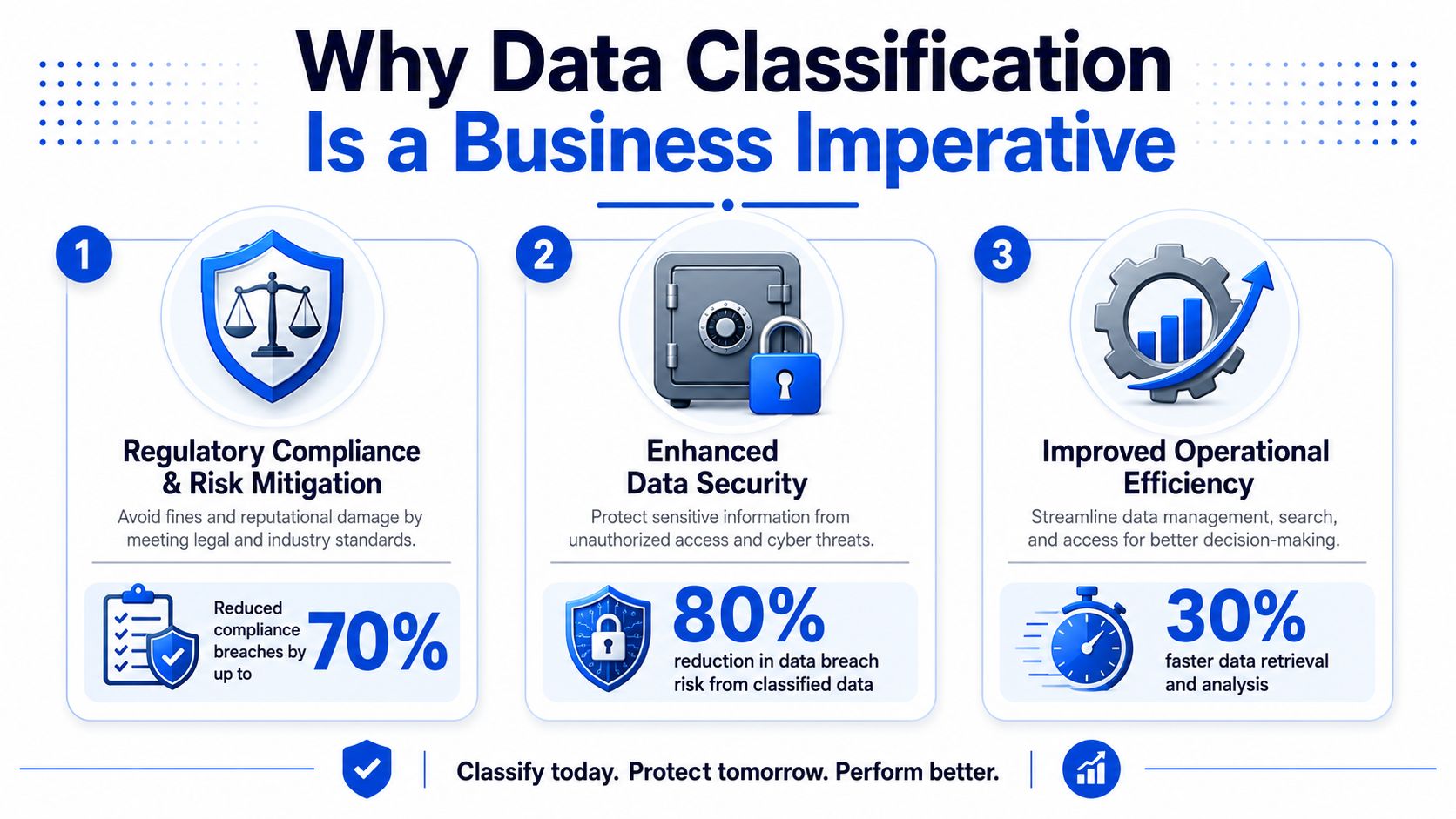
Data classification isn't a paperwork project. It's a resource allocation tool. A small company never has unlimited security budget, unlimited legal budget, or unlimited staff time. Classification tells the business where to spend effort first.
That urgency is visible in the market. The data classification market was valued at USD $1.65 billion in 2023 and is projected to reach USD $14.57 billion by 2032, reflecting a 27.40% CAGR from 2024 to 2032, according to SNS Insider's data classification market report. The important takeaway isn't the size of the market by itself. It's why companies are investing. Security and regulatory pressure have pushed classification into core business operations.
Security gets more precise
Without classification, companies often protect low-value and high-value data the same way. That wastes money and still leaves the biggest risks exposed. Classification narrows the focus. Restricted data gets stronger controls. Public data doesn't consume the same defensive attention.
That distinction matters when teams choose products. Microsoft Purview, Google Workspace labels, Microsoft Information Protection, and DLP rules in cloud platforms can all help. But tools only become effective when the company knows what it is trying to protect and why.
Compliance becomes provable
A buyer's security questionnaire rarely asks whether the company “cares” about privacy. It asks where personal data is stored, who can access it, what contractual controls exist, and how incidents are handled. Classification is often the first honest answer to those questions.
For a startup trying to close larger customers, that matters as much as legal theory. If the company can identify customer data, vendor data, and employee data by category, it's in a stronger position to implement a data processing agreement template and explain its handling rules with confidence.
Operations improve too
Classification also reduces friction inside the business. New employees find the right documents faster. Teams stop oversharing files by default. Finance knows which folders contain draft budgets versus approved statements. Engineering knows which repositories require stricter review and logging.
A similar pattern appears in adjacent operational disciplines. Work on Optimizing workflows with IoT and simulation shows the same principle. Systems become safer and easier to manage when teams distinguish critical assets from routine ones and design controls around actual risk instead of treating every component the same.
A company that classifies data well usually makes cleaner decisions elsewhere, because it has already learned to separate noise from exposure.
Common Data Classification Methods Explained
The question isn't only what data classification is. It's also how a company implements it. In practice, three methods dominate: content-based, context-based, and user-based classification.
Alation's overview of data classification describes these three methods and notes that a combined approach can improve sensitivity detection by 40% and reduce false positives by 35% compared with using a single method. That tracks with what smaller companies learn quickly. No one method catches everything without creating headaches.
Content-based classification
This method inspects what's inside the file or record. The system looks for patterns that suggest regulated or sensitive material, such as payment card data, government identifiers, or health information.
It works well when the company needs machine-readable rules. DLP systems, cloud security tools, and governance platforms often start here because content can trigger automatic labels.
Best use case: structured or semi-structured data with recognizable patterns.
Weakness: context can be missed. A harmless test file may look sensitive, and a subtly risky document may not contain obvious markers.
Context-based classification
This method uses clues around the file rather than the text alone. It considers metadata such as who created the file, where it is stored, which department owns it, and whether it sits in a folder meant for contracts, payroll, or product design.
For startups, context-based logic is often more affordable and easier to operationalize early. A folder named “Board Materials” or “Customer Security Reviews” already says a lot about expected sensitivity.
Best use case: cloud environments and fast-moving teams where files change hands often.
Weakness: metadata can be incomplete or misleading if folders and ownership aren't maintained.
User-based classification
This method asks the human creator or owner to apply a label. It sounds simple, but it's often the best starting point for small companies because it forces decision-making at the moment of creation.
The danger is inconsistency. One employee may label a sales export as “Private.” Another may call the same content “Confidential.” Training and short definitions matter here.
A simple comparison helps:
| Method | Strength | Limitation | Good starting point for SMBs |
|---|---|---|---|
| Content-based | Detects patterns inside data | Can over-flag or miss nuance | Later-stage scaling |
| Context-based | Uses metadata and location well | Depends on organized systems | Yes |
| User-based | Cheap and immediate | Relies on employee judgment | Yes |
The best small-business model is usually hybrid. Start with human labeling and folder logic. Add automated scanning where the legal or commercial downside is highest.
How to Build Your Data Classification Program
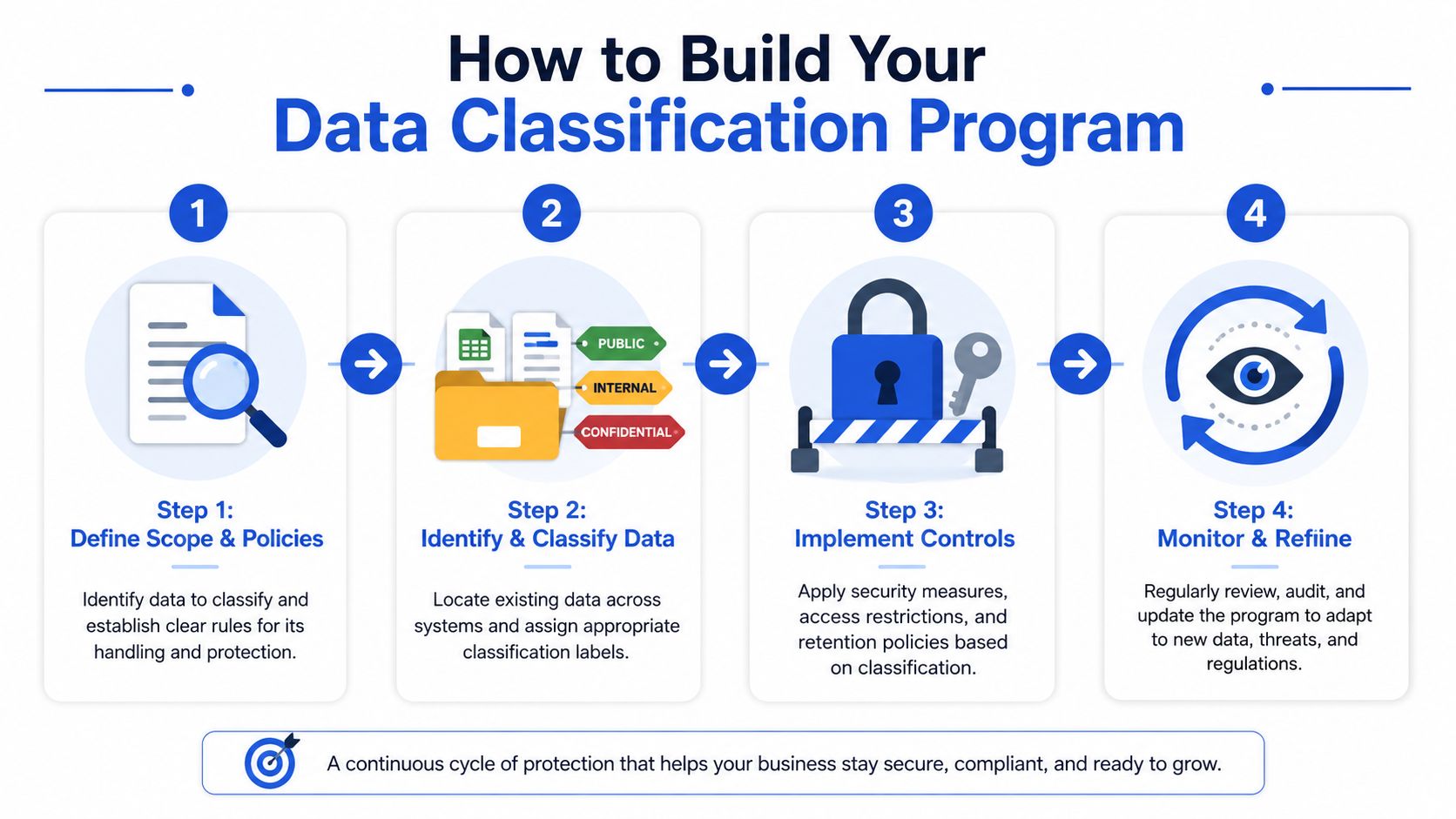
Most small companies don’t need a giant governance initiative. They need a sequence they can run. The most effective approach is narrow, documented, and tied to business risk.
That matters because 78% of SMBs cite data discovery as their top cybersecurity challenge and 60% lack formal classification policies, according to Fortinet’s data classification guidance. The companies that make progress usually don’t start by scanning every file they own. They start with the data that could hurt them fastest.
Step 1 Define scope and policy
Start with a one-page policy, not a manual. Define the classification levels, who owns each major data set, and what handling rule applies to each level.
A founder, operations lead, security lead, or outside counsel should be able to answer four basic questions:
- What categories exist.
- Which data types belong in each.
- Who decides the label if there’s doubt.
- What minimum control follows the label.
Keep the first version boring and clear. Confusion is the primary enemy.
A short retention framework belongs here too. Classification and deletion work together. Data that no longer needs to exist shouldn’t remain in circulation. A practical data retention policy template helps connect labels to deletion timelines and legal hold decisions.
Step 2 Identify the crown jewels
Don’t boil the ocean. Inventory the systems that matter most first.
Typical early priorities include:
- Customer systems: CRM exports, support records, onboarding documents
- People data: payroll, applicant files, benefits records
- Core IP: source code, architecture docs, roadmap material
- Finance and legal: forecasts, board decks, cap table records, key contracts
Many startups discover that “data classification” is really a visibility problem in disguise.
A practical walkthrough can help teams anchor the process before buying software:
Step 3 Label what matters first
Begin with new documents and high-risk repositories. Trying to relabel the entire company history on day one usually stalls the project.
Use native features where possible. Microsoft 365 sensitivity labels, Google Drive organizational rules, Notion workspace permissions, and repository protections in Git platforms all support practical first moves. The goal isn’t elegance. It’s repeatable handling.
Step 4 Apply controls and review
Classification without controls is cosmetic. Once labels exist, map them to actions:
- Public: broad access, integrity checks
- Private: employee-only access, limited external sharing
- Confidential: need-to-know sharing, approval gates for exports
- Restricted: encryption, strict access logging, stronger review, limited AI use
Reviewing the system matters too. The AWS whitepaper on classification models notes that data should be reviewed and reclassified at least annually under sound governance practice. That’s sensible because business value, legal obligations, and storage patterns don’t stay static.
Navigating Legal and Regulatory Requirements
Most privacy laws don’t explicitly state, “Thou shalt classify data first.” But in practice, classification is what makes compliance possible.
A company can’t respond properly to a deletion request, an access request, or a vendor diligence questionnaire if it doesn’t know which systems hold personal data and how sensitive that data is. GDPR, CCPA, and health-related state laws all become harder when records are mixed together without labels or ownership.
Compliance depends on finding the right data
Take deletion rights. If a customer asks for their data to be erased, the legal obligation isn’t satisfied by deleting one CRM record while copies remain in support exports, analytics snapshots, shared spreadsheets, and archived collaboration tools. Classification gives the company a map. It identifies what kind of data exists, where to search, and which systems deserve immediate attention.
The same logic applies to purpose limitation and access control. If a company stores health-related information, financial records, or employee data, it needs a way to distinguish that material from routine business content. Otherwise, internal access expands by default, and “least privilege” becomes more slogan than practice.
The breach clock starts fast
Under regulations such as GDPR, personal data breaches must be reported to authorities within a strict 72-hour window, as noted in this summary of data classification standards. A team can’t meet that deadline if it first has to figure out whether the affected files contained personal data at all.
Fast breach response is usually the output of earlier discipline, not heroic work during the incident.
That’s also why companies should connect classification work with broader data privacy and compliance planning rather than treating labels as a standalone IT exercise.
AI raises the stakes
AI has changed the legal posture around internal data. Teams now move documents into copilots, prompt libraries, note tools, and model training workflows that didn’t exist in ordinary business operations a few years ago. The key legal question is no longer only “Is this confidential?” It is also “May this be used in AI systems, and under what conditions?”
A useful extension is an AI-specific handling rule layered onto the existing taxonomy. For example, some Restricted data may be “Do Not Upload to Public Models” or “Do Not Train.” That kind of instruction turns an abstract AI governance debate into an enforceable operational rule.
A Practical Checklist for Getting Started
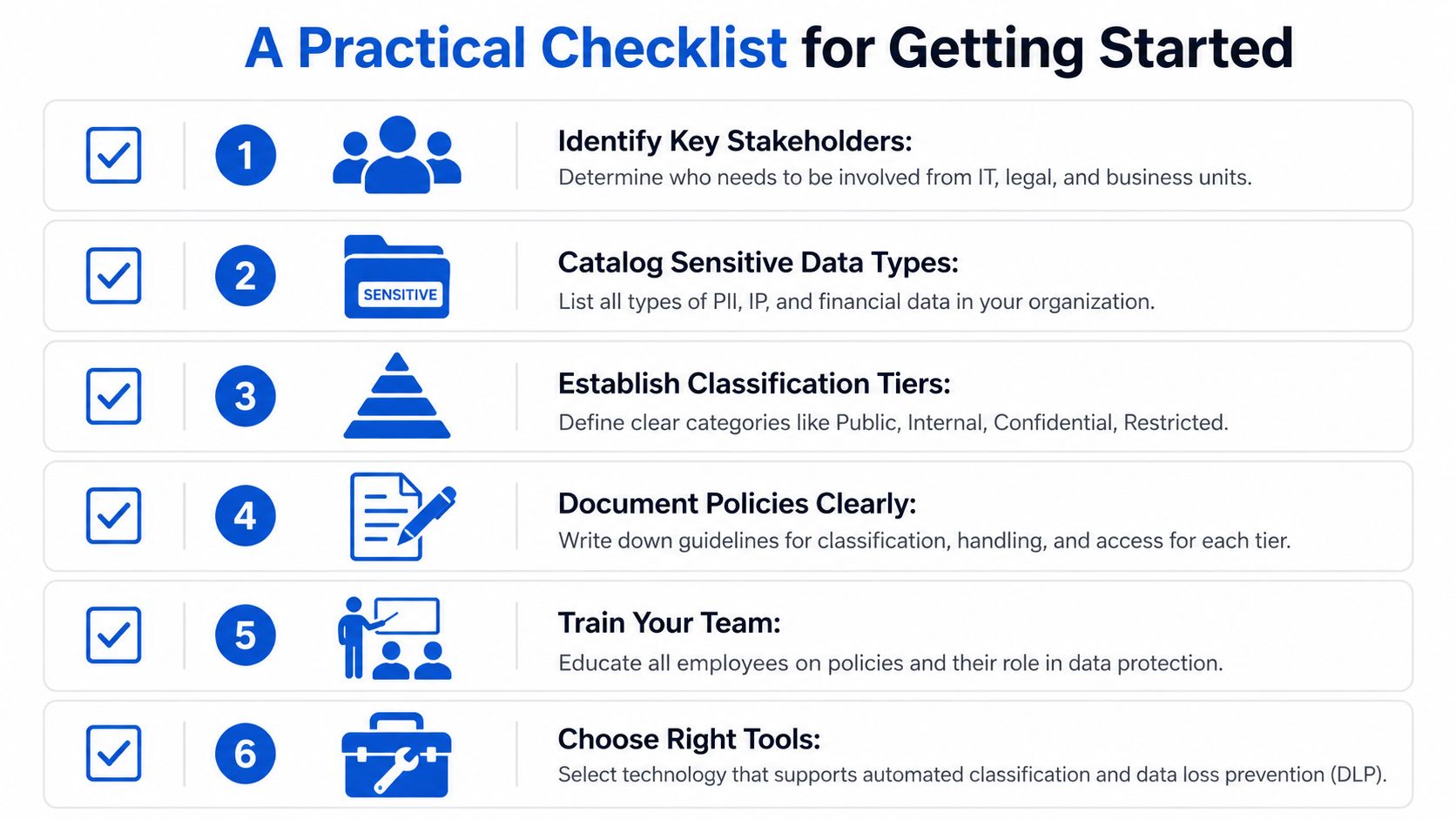
Most companies don’t need to solve everything this quarter. They need a starting list and a deadline. A working checklist keeps classification from turning into a postponed governance project.
A first-week checklist
- Set one short meeting: Bring together operations, legal, IT, and whoever owns customer data. Use the meeting to define the initial four levels.
- List the five most sensitive data assets: Focus on what would create the worst legal, customer, or revenue damage if exposed.
- Choose simple labels: Public, Private, Confidential, and Restricted are enough for most startups.
- Write one page of rules: State who can label data, where labels appear, and what handling rule follows each label.
- Review sharing permissions: Check major cloud folders, contract repositories, HR systems, and product documentation spaces.
- Train employees on new files first: It’s easier to build the habit prospectively than to relabel years of history.
Keep the documentation light enough to use
Many small teams fail because they overproduce policy language and underproduce usable instructions. A classification standard should fit into onboarding, daily workflows, and incident response. If staff need a committee to decide how to label an exported customer report, the system is too heavy.
For teams trying to make the documentation side manageable, guidance on streamlining security docs can help translate policy obligations into materials employees will reference.
Start with the data that could cost the company trust, revenue, or legal leverage. Everything else can follow after the process works.
By Design Law Firm & Legal Consultancy, PLLC helps startups and growing businesses build practical legal foundations around data governance, privacy, cybersecurity, contracts, and AI risk. For companies that need clear advice on data classification, incident readiness, compliance planning, or commercial documentation, By Design Law Firm & Legal Consultancy, PLLC offers business-focused counsel designed for real operating conditions. Contact us at (206) 593-1519.